AI TOOL / #05985
Voiceboost – ChatGPT
A Chrome extension designed for voice-controlled interaction with ChatGPT.
Introduction
Chrome extension for voice-controlled ChatGPT interaction.
What is the Voiceboost AI Chrome extension/plug-in?
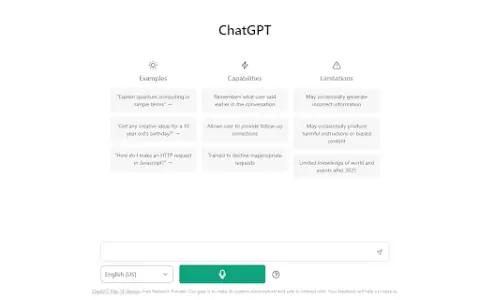
Voiceboost is a Chrome extension that allows users to interact with ChatGPT via voice commands. It adds a button below the input field; by clicking this button, the system captures the user’s verbal inquiries and sends them to ChatGPT for responses. This provides a hands-free alternative for entering text.
How to use the Voiceboost AI Chrome extension/plug-in?
Click the button added below the input area to start recording your voice input. Alternatively, use the keyboard shortcuts: Ctrl+Shift+S (Windows) or Command+Shift+S (Mac) to begin recording, and Ctrl+Shift+E (Windows) or Command+Shift+E (Mac) to stop and submit the recording. Make sure to grant microphone access when prompted.
The core functionality of the Voiceboost AI Chrome extension/plugin
Voice input for ChatGPT
Keyboard shortcuts for voice capture and submission
Related
Create a video instantly.
An AI short-video tool that creates the audio first and then matches it with visuals.
GPTsdex
It brings together over 10,000 customized GPT models to facilitate AI-generated content creation and the development of relevant communities.
OpenGPT.com
OpenGPT is an AI platform that integrates tools, GPT technology, and community features.
tooldirectory.ai
A comprehensive directory designed to help users discover, explore, and compare various AI tools.
Nextool
A comprehensive catalog of over 10,000 AI tools available for both businesses and individuals.
MimicPC
MimicPC: an affordable, customizable, open-source AI platform accessible from any browser.