AI TOOL / #07466
Reverse image search by Copyseeker
Copyseeker image search offers advanced image-search capabilities with just a simple right-click operation.
Introduction
Copyseeker Image Search provides advanced image search capabilities through a simple right-click.
What is the Copyseeker Image Search AI Chrome extension/plug-in?
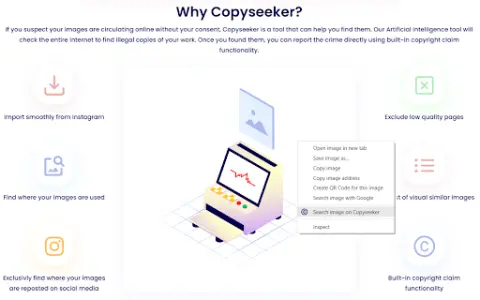
Copyseeker Image Search is a tool designed to enhance the browsing experience by offering advanced image-search capabilities. Users can right-click on any image and select “Search for this image in Copyseeker” to have the image analyzed and obtain detailed information about it.
How to use the Copyseeker Image Search AI Chrome extension/plug-in?
When browsing web pages, right-click on any image and select the option “Search for this image on Copyseeker”. Afterwards, Copyseeker will analyze the image and provide detailed information regarding it.
The core functionality of the Copyseeker Image Search AI Chrome extension/plug-in
Search for images with just one right-click.
Advanced Image Analysis
Fast and efficient results
Privacy-conscious image search
Related
Crammer: Save time using AI
Crammer is a Chrome extension that uses AI to extract key information from articles.
tl;dr: GPT3 News Summarizer
An AI-based news summary tool that uses GPT3 to extract information quickly and efficiently.
SumMe – AI Article Summarizer
An AI web article summary generator based on GPT-4, which provides concise summaries.
WP AI Text Summarizer
A WordPress plugin designed for AI-powered text summarization, aimed at enhancing SEO performance and increasing user engagement.
T.read – AI based reading assistant
T.read is an AI-powered reading assistant that provides concise summaries of articles.
Casper AI
Casper AI is a Chrome extension that uses artificial intelligence to summarize content and streamline workflows.