AI TOOL / #07462
Vision AI
A Chrome extension that enables AI-driven insights based on screenshot data.
Introduction
Chrome extension for AI-powered insights from screenshots.
What is a Vision AI Chrome extension/plug-in?
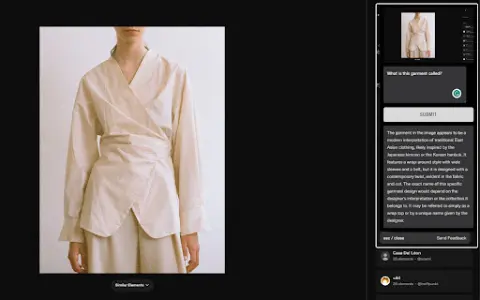
Visual AI is a Chrome extension that combines screenshot functionality with AI-driven insights to enhance online information search. It allows users to capture any portion of a web page, add notes or questions, and receive AI-generated responses based on the context of the captured image.
How to use the Vision AI Chrome extension/plug-in?
Install the Visual AI Chrome extension. Use CTRL + SHIFT + Y to take a screenshot, and then add any notes or questions you have. Visual AI will analyze the screenshot and provide an AI-generated response.
The core functions of the Vision AI Chrome extension/plugin
Screenshot capture
Interactive AI Suggestions
Seamless browser integration
Suitable for a wide range of applications in various fields
Privacy and Security
Related
Gnbly
An AI assistant used for handling phone calls, making reservations, providing customer service, and evaluating the potential suitability of new customers.
heyLibby
An artificial intelligence assistant designed to assist with interactions with potential customers, eligibility verification, and appointment scheduling – especially ideal for small businesses.
nettle.ai
Using mixed reality technology to create realistic digital humans for a “physical + digital” experience.
Call AI – Smart Call Assistant
An AI-powered virtual call assistant for call handling, appointment scheduling, and spam call blocking.
Snowball AI – ChatGPT in WhatsApp
A WhatsApp chatbot powered by ChatGPT, used for answering questions and performing other tasks.
ChatGPT in WhatsApp – Jinni AI
Jinni AI is an artificial intelligence assistant based on ChatGPT, and users can use it to complete various daily tasks via WhatsApp.