AI TOOL / #06484
Text to Speech (TTS) Read Aloud Voice Reader by Audeus
A text-to-speech app with realistic sounds to boost productivity.
Introduction
A text-to-speech app with lifelike voices for increased productivity.
What is Audeus AI Voice Reader ai chrome extension/plugin?
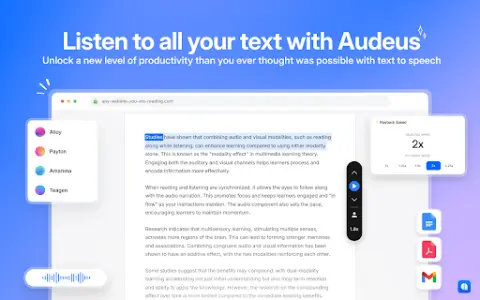
Audeus AI Speech Reader is a text-to-speech (TTS) application designed to convert text from a variety of sources (such as PDF files, Google Docs, emails, Word documents, web pages, and articles) into engaging audio. It is designed to save time and increase productivity by allowing users to listen to content instead of reading it. Audeus has realistic artificial intelligence sounds that enhance the listening experience and keep users engaged.
How to use Audeus AI Voice Reader ai chrome extension/plugin?
Audeus processes text from the current web page or document and converts it to audio on the fly. Users can listen to emails, study materials, or any other text content. The app works across multiple platforms, including Gmail, Google Docs, and other web pages.
Audeus AI Voice Reader ai chrome extension/plug-in core features
Supports text-to-speech for multiple document types and web pages
Realistic AI sounds
Adjustable playback speed (0.5x to 3.5x)
Synchronized text highlighting
Custom text editor with read-aloud functionality
Cross-device synchronization of reading progress
Supports 50+ languages and 150+ voices
Related
FlowUs information flow
Use Flowus to build your knowledge platform and help you create and publish content with ease.
SaveFrom.net
维棠9千千静听✅❌❌音频播放/转换,绿色foobar2000、AIMP、QQ影音10MXPlayer✅❌❌Android全能播放器VLC、PotPlayer11QQ影音✅❌❌无广告轻量播放器PotPlayer、VLC12
Cat and Fox Search
It is possible to sort and filter results based on the type of cloud storage or the time when the files were uploaded. Additionally, within the “All Categories” option, users can specifically select file types such as videos, music, images, or documents for searching. This approach likely makes the search process more efficient compared to other methods, as it allows users to exclude unnecessary file types from the results.
suffix
(You can also choose services like Hotmail, etc.), while the rest indicate that the domain belongs to an educational institution.
Pluralsight
Introduction: An overseas IT professional skills learning platform offering courses in software development, cloud computing, and network security. These programs are designed with a focus on practical project-based learning and are ideal for programmers and technical professionals looking to advance their skills.
507movements
04 · Fold ’N Fly: All you need is a piece of paper to start playing. For your first attempt, you can choose the “Easy” option and select a pattern that doesn’t require scissors.