AI TOOL / #05433
OpenAI expenses checker
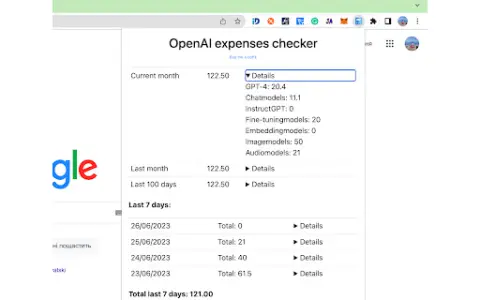
A Chrome extension that allows you to quickly check your OpenAI fees in your browser.
Introduction
Chrome extension for quickly checking OpenAI expenses directly in your browser.
What is the OpenAI Expenses Checker Chrome extension/plug-in?
The “OpenAI Fee Checker” Chrome extension offers a faster and more convenient way to keep track of your OpenAI costs. With this extension, you can directly access the fee-tracking functionality within your browser, saving time and eliminating the need to visit a separate website. It features a user-friendly interface that seamlessly integrates with your browser, and provides real-time updates and notifications, making cost management much simpler and more efficient.
How to use the OpenAI Expenses Checker Chrome extension/plug-in?
Install the “OpenAI Fee Checker” Chrome extension from the Chrome Web Store. Once installed, you will be able to check your OpenAI fees directly within your browser, without having to visit a separate website.
The core functionality of the OpenAI Expenses Checker AI Chrome extension/plug-in
Directly track expenses within the Chrome browser.
A simplified interface that facilitates quick and easy access.
Real-time updates and notifications
Related
Instant Data Scraper
Automated data extraction tool using AI for website data scraping.
DeGen.ai
DeGen.AI: An AI-powered tool for generating, enhancing, protecting, and analyzing data.
lang.ai
Lang.ai automates data engineering processes and utilizes AI agents to extract actionable insights from Snowflake data.
CapGo.AI
AI-driven platform for automated network data collection and enrichment.
ChoiceChaser
The feature mining platform drives product growth by analyzing user feedback.
Juno LXP
The LXP extension is designed for personalized learning and content request management.