AI TOOL / #05085
QuantTalk
QuantTalk: Use natural language to create and optimize quantitative investment strategies.
Introduction
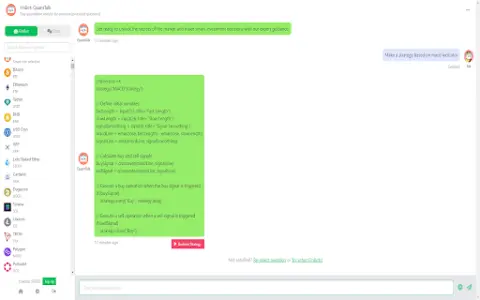
QuantTalk: Create and backtest quantitative investment strategies using natural language.
What is the QuantTalk AI Chrome extension/plug-in?
QuantTalk is a powerful investment tool that enables investors to easily create quantitative strategies using natural language. It automatically performs backtesting on TradingView and provides the results for review. In addition, it allows users to generate professional indicator charts through natural language input, giving everyone the opportunity to become an expert in quantitative analysis.
How to use the QuantTalk AI Chrome extension/plug-in?
Describe the investment strategy you wish to implement using natural language. QuantTalk will automatically perform backtesting on TradingView and provide the results. You can also use natural language to create custom indicator charts.
The core functions of the QuantTalk AI Chrome extension/plug-in
Creation of Natural Language Strategies
Automated backtesting on TradingView
Creation of professional indicator charts
Related
MyJr from Jurisage
A legal assistant that provides immediate insights based on case studies throughout the research process.
Juris AI – Danish Legal AI Assistant
An AI-based Danish legal assistance tool that supports research, drafting, and analysis.
Case Radar
A legal technology platform utilized for research, providing recommendations, creating documents, and facilitating connections between lawyers.
LIKN
LIKN connects Web2 content to Web3, enables the creation of NFTs via URLs, and provides AI-powered metadata generation services.
AI Crypto Price Notifier
A Chrome extension designed for real-time monitoring of cryptocurrency prices and AI-driven analysis.
Zion Trading Algos
An automated futures trading system compatible with NinjaTrader, which eliminates emotional biases and enhances the accuracy of trades.