AI TOOL / #04142
ChatGPT Online for Google
This Chrome extension integrates ChatGPT with Google Search to provide personalized answers.
Introduction
Chrome extension integrating ChatGPT with Google search for personalized answers.
What is the ChatGPT Online extension/plugin for Google Chrome?
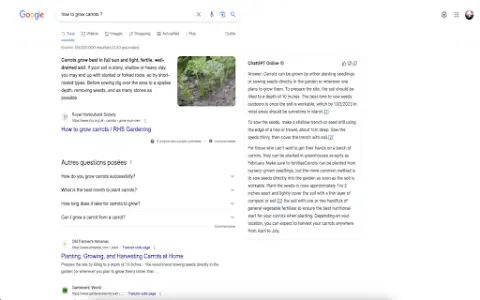
The ChatGPT Online Google Extension is a Chrome browser extension that integrates the AI-powered ChatGPT with the Google Chrome browser. It adds a sidebar to the Google search results page, displaying answers provided by ChatGPT, with the aim of offering more accurate and personalized responses by analyzing users’ search queries.
How to use the ChatGPT Online extension/plug-in for Google Chrome?
Install the extension from the Chrome App Store. After installation, a sidebar will appear on the Google search results page, displaying ChatGPT’s responses to your queries.
The core features of the ChatGPT Online extension/plug-in for Google Chrome.
Seamless integration with Google Chrome
Display the answers in real-time in the sidebar.
Provide personalized answers based on query analysis.
Supports both the official OpenAI API and ChatGPT Plus.
Supports Markdown rendering and code highlighting.
Provides dark mode for low-light environments.
Related
SRE.ai
An AI-driven automation platform for Salesforce development teams.
Potpie AI
Potpie AI: A custom AI agent for code repositories that enhances the efficiency of engineering tasks.
LiftmyCV
An AI job assistant that automates job applications.
mindbehind.com
An AI-powered platform that delivers personalized cross-channel customer experiences.
Emergence AI
Build, train, and deploy an AI platform for AI agents to automate your business.
Sourcery Sentinel
An AI agent that automatically resolves production issues and enhances code quality.