AI TOOL / #04050
AI Roundtable
Ask a question and receive answers from multiple AI assistants.
Introduction
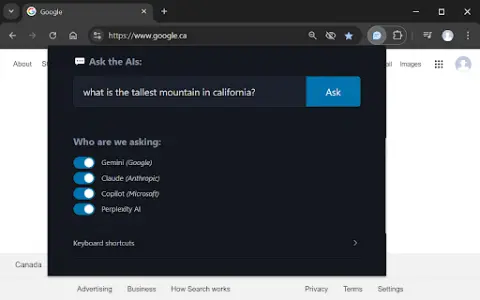
Ask one question, get answers from multiple AI assistants.
What is a Multiple AI Assistants Chrome extension/plug-in?
This website allows users to submit questions at once and receive answers from multiple AI assistants. Users can customize which assistant they want to use for their queries. The website also provides keyboard shortcuts, making it easy to access various functions quickly.
How to use the Multiple AI Assistants Chrome extension?
Use the shortcut keys Ctrl/Cmd + Shift + Q to open the query window and start typing your question. Use Alt + 1 to switch to Gemini, Alt + 2 to switch to Claude, Alt + 3 to switch to Copilot, and Alt + 4 to switch to ChatGPT.
The core functions of various AI Assistant extensions/plugins for Chrome.
Query multiple AI assistants simultaneously
It is possible to customize the selection of AI assistants.
Convenient and fast keyboard shortcuts
Related
Adrenaline
Adrenaline answers questions about your code by analyzing your code base.
HomeworkAI ai
An AI-driven task assistant that offers step-by-step solutions for various subjects.
NLMatics Motif Plugin
NLMatics Motif provides precise answers from web pages/PDFs, making rapid research and team sharing possible.
PageSage
An AI browser assistant for quickly accessing information on web pages.
Canvas Quiz Solver
An AI-driven browser extension that allows users to obtain answers to Canvas quizzes in real time.
Candle AI – Powered by ChatGPT
An artificial intelligence tool that uses GPT-3 to quickly generate text search results.