AI TOOL / #03842
TabJam for ChatGPT
A ChatGPT plugin that allows web content to be integrated into conversations.
Introduction
A ChatGPT add-on for integrating web page content into conversations.
What is the TabJam AI Chrome extension/plug-in?
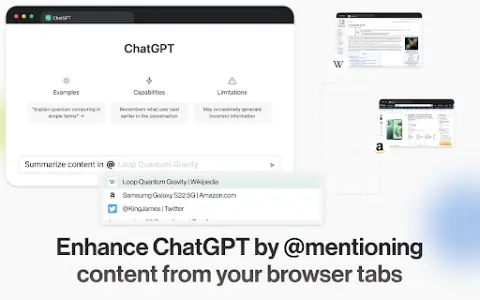
TabJam is a free third-party plugin for ChatGPT that offers users new functionality, enabling them to easily integrate web page content into their conversations with ChatGPT. It allows users to @mention open tabs in their browsers within ChatGPT messages in order to extract relevant content, or it enables them to start a new conversation related to the contents of a specific web page by using simple shortcut keys.
How to use the TabJam AI Chrome extension/plug-in?
In ChatGPT, there are two ways to use TabJam: one is by using tags initiated through @mentions, and the other is by using shortcut keys ([Cmd ⌘]+J or [Ctrl]+M) while viewing a web page to start a new conversation and obtain the content of that page.
The core functions of the TabJam Chrome extension/plugin
Integrate the content of the opened browser tab into the ChatGPT conversation.
Use a shortcut key to start a new chat session regarding the content of the web page.
@Use the mention tag to include the relevant content in your ChatGPT messages.
Related
Doc2cart
Use OCR technology to automate the extraction of document data for use in e-commerce.
Biolytics
Biolytics is an app for tracking and understanding biomarker trends in lab test results.
Procys
An AI-based automated document processing and data extraction platform.
Redactable
AI-powered document editing software for quickly and securely removing sensitive data.
Alphamoon
An artificial intelligence-based platform designed for intelligent document processing and data extraction.
Image to Text (OCR)
A Chrome extension designed to extract editable text from images and PDF files.