AI TOOL / #02512
Calendar Cleaner
A Chrome extension designed to optimize meetings and enhance productivity.
Introduction
Chrome plugin to optimize meetings and improve productivity.
What is the Lexi Calendar Cleaner AI Chrome extension/plug-in?
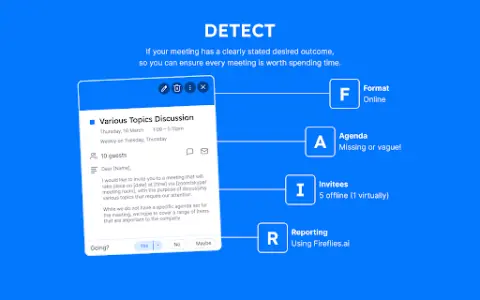
The Lexi Calendar Organizer is a Chrome extension designed to optimize meetings and enhance productivity. It helps users save up to 30% of their working time by ensuring that meetings have clear objectives and agendas. Integrated with Google Calendar, this extension can detect missing meeting outcomes, suggest improvements, and remind users to enter important meeting details.
How to use the Lexi Calendar Cleaner AI Chrome extension/plug-in?
1. Install the Chrome extension.
2. Go to your Google Calendar and click on an existing event. The system will check whether there are any objectives or outcomes associated with that event, and then suggest either adding those details or rejecting the meeting.
3. When creating a new event, the extension will remind you to add a description and suggest including statements about the purpose or expected outcome of the event.
The core functions of the Lexi Calendar Cleaner AI Chrome extension/plugin
Check for any missing meeting results.
It is recommended to improve the arrangement of these meetings.
Remind users to enter the meeting objectives and agenda.
Integration with Google Calendar
Related
Miaoban AI Drawing Tool
Miaoban Paintboard is an online drawing tool. With the support of AI, Miaoban Paintboard allows users to generate PPTs, flowcharts, mind maps, prototypes, intelligent charts, and organizational structure diagrams with just one click. It also offers an AI-based question-and-answer function that can help create various types of content, reports, and more! As a drawing tool, it provides the basic functions necessary for creating visual representations.
BigG AI PPT
BigG AI PPT is a powerful PPT generation tool that utilizes AI language models. Users can simply enter a topic to create a PPT with just one click. The software comes with customized PPT templates that can be easily changed at the touch of a button. Members enjoy additional features, and the service offers a free trial option. Key features of the product: (1) Enter a topic and generate a PPT in just one click.
ChatGAi
ChatGAi is a multi-functional AI tool for writing, Q&A, chat, and translation developed based on the ChatGPT interface! No special network is required, and the artificial intelligence chat system with the same capabilities as ChatGPT can be used in the country! Multiple built-in AI roles allow you to interact with various industries
ZHelper Assistant
The zhelper search configuration tool: zhelper search is a search assistant for the Z-Library e-book resource website. It does not contain its own search interface; rather, it is merely a search page that requires us to manually import a search interface in order to function properly.
GPT Mind Map
As one of the first platforms to utilize the “AIGC+ Mind Mapping” technology, TreeMind enables users to create detailed mind maps with just a single sentence. This marks the beginning of a new era in AI-generated mind mapping tools, as such technologies can significantly enhance both your learning and working efficiency. In addition, TreeMind offers millions of pre-designed templates that cater to the needs of various industries and specialized fields – truly a versatile tool.
WizTree
WizTree is a free software for analyzing computer disk space. It directly reads the Master File Table (MFT) from NTFS-formatted drives, which enables it to operate at extremely fast speeds – in fact, it is considered one of the fastest disk analysis tools in the industry. This program uses visual tree diagrams to provide an intuitive display of disk usage based on the amount of space occupied by files and folders.