AI TOOL / #02217
CSV and Parquet viewer
Use Chrome extensions to view, filter, and analyze CSV and Parquet data, leveraging artificial intelligence technologies.
Introduction
View, filter, and analyze CSV and Parquet data with AI, using a Chrome extension.
What is the Tab Lab AI Chrome extension/plug-in?
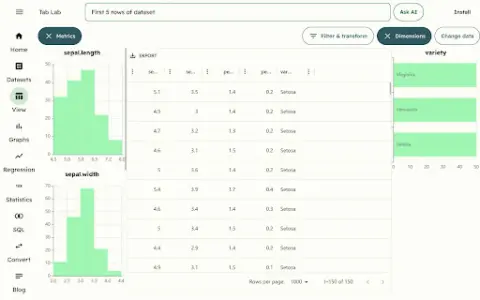
Tab Lab enables you to view, filter, and analyze CSV and Parquet data using artificial intelligence. The Tab Lab Chrome extension allows you to open CSV and Parquet files directly from websites within Tab Lab.
How to use the Tab Lab AI Chrome extension/plug-in?
Install the Tab Lab Chrome extension. This extension allows you to open CSV and Parquet files directly from websites. Then, use the Tab Lab interface to view, filter, and analyze the data.
The core functions of the Tab Lab AI Chrome extension/plug-in
View, filter, and analyze CSV and Parquet data.
Data analysis based on artificial intelligence
Chrome plugins allow you to open files directly.
Related
Talkery: AI analyser
Talkery is a Chrome extension powered by AI speech analysis technology, which provides real-time feedback on communication patterns and offers suggestions for improvement.
Instaminutes – #1st Meeting Intelligence tool
Instaminutes reduces meeting summaries to concise, actionable notes that are only one-tenth the length of the original transcribed text.
Rafiki
Record, transcribe, summarize, and analyze online meetings.
Meetklu
Klu Meet captures and transcribes meetings, while also providing AI-generated notes.
Claap
AI sales assistant automates transaction records, CRM updates, follow-up emails, and provides insights.
Observe.AI Screen Recording
Browser extension for recording an agent's screen during customer interactions, for use with Observe.AI.